
Cursor Type
Tickerplant Chart provides user with four different types of cursor namely
-
Cross Lines
-
Vertical Lines
-
Circle
-
None
The cursor enables the user to better position and focus on the chart in order to refer values accurately for analytical studies.
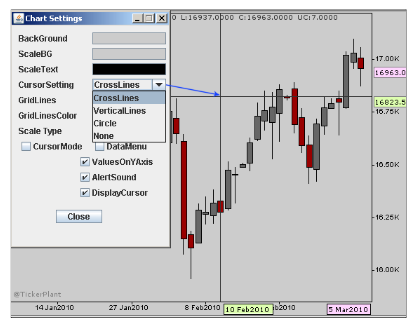
Different cursor types
Data Menu
The Data Menu displays the values of all the applied studies and indicators in a popup. It enables user to analyze and collectively view the values at a glance. All the values are dynamically updated for their respective studies and indicators thereby providing accurate and ready reference. Data Menu can be either enabled or disabled by a click on the checkbox of Data Menu in Chart Settings.
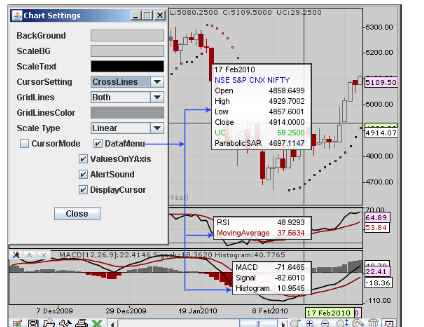
Values at glance in data menu
 Settings: [ ALT + Z]
Tickerplant Chart offers the most customizable, configurable and visually appealing features. User can change and configure every aspect of the chart as per choice with a click on chart settings button. User can change background and scale background color, cursor setting, grid setting, data menu setting and more.
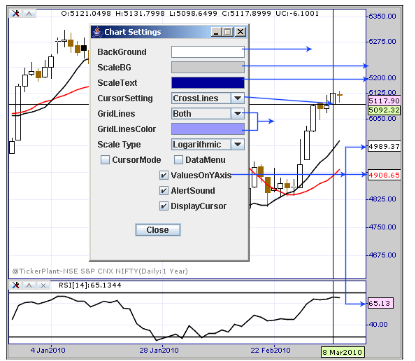
Different chart settings
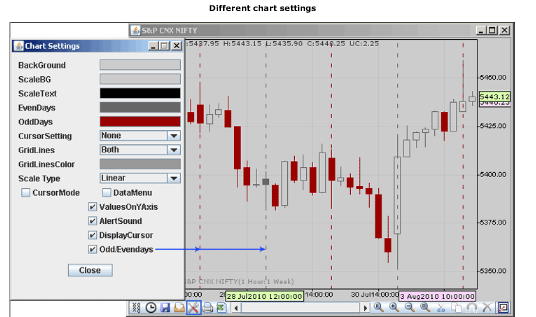
Chart settings also enable the user to distinctly identify each day via the Odd/Evendays option when an intraday chart is plotted
Comments
0 comments
Please sign in to leave a comment.