
MarketView® allows you to identify arbitraging opportunities by comparing international spot and futures prices of precious metals, base metals and commodities in the energy sector. It takes into account the US Dollar exchange rate while calculating the parity or disparity between the prices of two commodities or contracts.
To use a Parity Calculator
-
Click Tools >Calculators > Parity
The Parity Calculator window is displayed.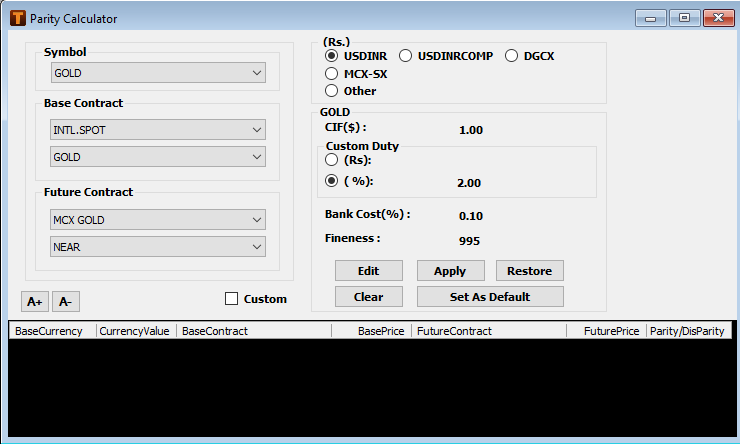
-
From Symbol, choose the required symbol (commodity).
-
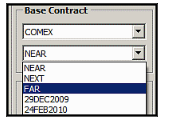
From Base Contract, choose the required contract for the respective exchange and its expiry as applicable.
-
From Future Contract, select the contract and the expiry date.
-
From (Rs.), choose the exchange rate for USDINR either:
-
USDINR: international spot price
-
USDINRCOMP: composite USDINR price
-
MCX-SX: USDINR futures price
-
Other: Enter a custom exchange rate
-
-
Click Edit if you want to modify the default values for the selected metal:
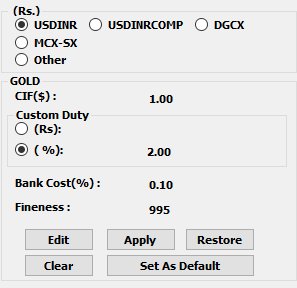
Click Set As Default to set these values as default for the selected metal.
Click Clear to clear the parity calculations from the table.
Click Restore to restore the defaults.
-
Click Apply.
The parity or disparity between the base and futures contract is displayed in the table.
The base / futures contract can either be a commodity or commodity futures contract traded on an international exchange / domestic exchange and vice-versa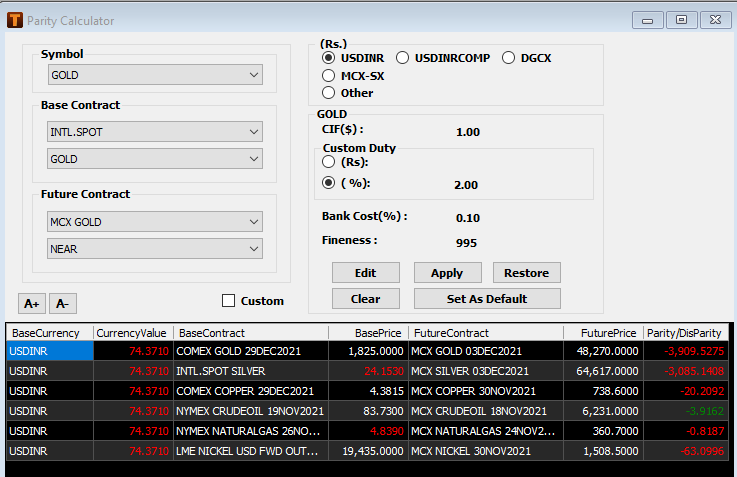
Right-click a record and click Delete to delete it.
Comments
0 comments
Please sign in to leave a comment.