
The Visual Settings tab allows you to customize the following in the MarketWatch window:
This is also applicable for the profiles/reports opened through the menu
-
Click Tools > Preferences.
The Preferences window is displayed. -
Click Visual Settings.
The Visual Settings tab is displayed.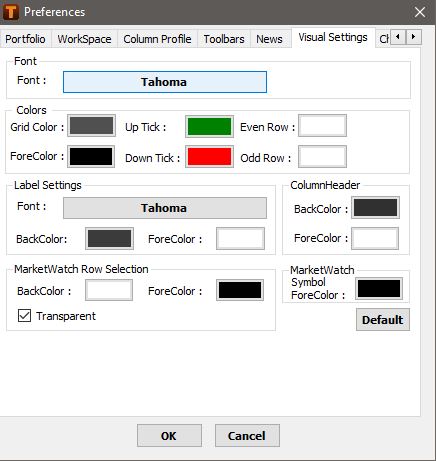
-
Specify the following options:
|
Font |
Description |
|
Font |
Specify the font for the text. |
|
Colors |
Description |
|
Grid Color |
Specify the color of the grid. |
|
ForeColor |
Specify the color of the text. |
|
Up Tick |
Specify the color for rise in Bid / Ask , LTP, Net Chg , % Chg. |
|
Down Tick |
Specify the color for fall in Bid / Ask, LTP, Net Chg , % Chg. |
|
Even Row |
Specify the color for the even row. |
|
Odd Row |
Specify the color for the odd row. |
|
Label Settings |
Description |
|
Font |
Specify the font for the label. |
|
BackColor |
Specify the background color for the label. |
|
ForeColor |
Specify the text color for the label. |
|
ColumnHeader |
Description |
|
BackColor |
Specify the background color for the column header. |
|
ForeColor |
Specify the font color for the column header. |
|
MarketWatch Row Selection |
Description |
|
BackColor |
Specify the background color when any row is selected. |
|
ForeColor |
Specify the text color when any row is selected. |
|
Transparent |
Retains the existing background and text color when any row is selected |
|
MarketWatch Symbol |
Description |
|
ForeColor |
Specify the font color for the text in the Description, Symbol, and SSymbol column. |
-
Click OK.
Your settings are saved. Open a new MarketWatch window to view the changes.
The changes to visual settings are effective to existing user profile upon subsequent login.
Click Default to apply the default system settings
Comments
0 comments
Please sign in to leave a comment.