
The General tab allows you to choose the preferred exchange and other default settings.
-
Click Tools > Preferences.
By default, the General tab in the Preferences window is displayed.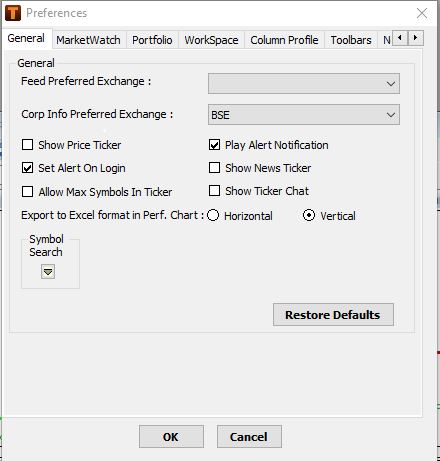
-
Specify the following options:
Option
Description
Feed Preferred Exchange
Choose the preferred exchange to be selected by default while creating market watch portfolio.
Corp Info Preferred Exchange
When scrip is dragged and dropped from Corp Info Search Window to Market Watch then the selected exchange is applicable by default.
Show Price Ticker
Displays the ticker on the screen.
Applicable on subsequent login
Play Alert Notification
Plays an alert notification sound
Set Alert On Login
Set Alert On activates the alert set on login by default and displays the alerts if condition is met subsequently
Applicable on subsequent login
Show News Ticker
Displays the News Ticker by default on subsequent login
Allow Max Symbols in Ticker
This option enables the user to create and apply a ticker profile upto 20 symbols on subsequent login
Export to Excel format in Perf. Chart
Choose the format to view the data exported from a performance chart in excel:
Horizontal: The data for symbols compared is placed horizontally one after the other
Vertical: The data for symbols compared is placed vertically one below the other
See also: Viewing Performance Charts
-
Click OK.
Your settings are saved.
Click Restore Defaults to apply the default system settings
Comments
0 comments
Please sign in to leave a comment.