
The News tab allows you to customize the headline settings, background, flash news, special news, label and the reading pane for the news window.
-
Click Tools > Preferences.
The Preferences window is displayed. -
Click News.
The News tab is displayed.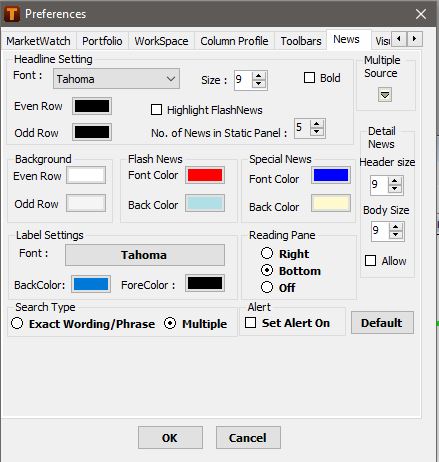
-
Specify the following options:
|
Headline Settings |
Description |
|
|
Font |
Specify the font for the headline. |
|
|
Size |
Specify the size of the font. |
|
|
Bold |
Bolds the headline text. |
|
|
Even Row |
Specify a color for the font in the even row. |
|
|
Odd Row |
Specify a color for the font in the odd row. |
|
|
Highlight FlashNews |
Highlights the row displaying the flash news. |
|
|
No. of News in Static Panel |
Specify the number of rows appearing in the Static Panel. |
|
|
Background |
Description |
|
|
Even Row |
Specify the color for the even row displaying the news. |
|
|
Odd Row |
Specify the color for the odd row displaying the news. |
|
|
Flash News |
Description |
|
|
Font Color |
Specify the font color displaying the flash news. |
|
|
Back Color |
Specify the row background color displaying the flash news. |
|
|
Special News |
Description |
|
|
Font Color |
Specify the font color displaying special news. |
|
|
Back Color |
Specify the row background color displaying special news. |
|
|
Label Settings |
Description |
|
|
Font |
Specify the font for the label. |
|
|
BackColor |
Specify the back color for the label. |
|
|
ForeColor |
Specify the fore color for the label. |
|
|
Reading Pane |
Description |
|
|
Right |
Displays the reading pane to the right of the news window. |
|
|
Bottom |
Displays the reading pane at the bottom of news window. |
|
|
Off |
Does not display the reading pane. |
|
|
Search Type |
Description |
|
|
Exact Wording/Phrase |
Displays news items that contain text which exactly matches the search text |
|
|
Multiple |
Displays news items that contain text as specified by the search text and operators such as +, -, OR, AND, () |
|
|
Multiple Source |
Select the news sources on which the Quick Search term or filter when ‘ALL’ sources option selected should be applicable by default. For e.g. You may want to set the search only on TickerNews and DowJones by default |
|
|
Detail News – Header Size |
The user can customize the font size to appear by default for the news headline |
|
|
Detail News – Body Size |
The user can customize the font size to appear by default for the news details |
|
|
Allow |
In order to make the font specification for Header / Body effective, this option needs to be checked. |
|
|
Default |
The user can revert to default settings on click of the default tab |
|
|
Alert |
Selecting the ‘Set Alert On’ option will have the option on by default on login |
|
|
|
|
|
-
Click OK.
Your settings are saved. Open a new News window to view the changes.
Click Restore Defaults to apply the default system settings
Comments
0 comments
Please sign in to leave a comment.